Generate MQL drafts, repair compiler blockers, run readiness checks, govern prop-style risk, and export the work for manual MetaEditor and Strategy Tester review.
Pricing comes after the first useful output: draft, compiler fix, risk check, or export workflow.
Pick the blocker you have today. No email required. Start with the one users bring most often: CTrade setup.
The first path preloads a real `trade` undeclared error, then keeps the EA draft, fix notes, and tutorial links together before any opt-in or paid plan.
Generate, debug, or govern first. Upgrade only when quota, downloads, or deeper review becomes the blocker.
Optional blocker pass
Pick the workflow that is blocking your next EA build. The request stays opt-in and manual-reviewed by Felicien from the owner mailbox.
trial request
Lead activation handoff
No email wait is required. After saving the opt-in, continue into the matching free desk so the lead-to-workflow path is measurable.
After a useful output, the next CTA is a manual trial/demo review. That creates a measurable CRM trial request instead of another generic lead.
Conversion workflow
From EA idea to governed testing workflow.
Workfusionapp is built around the jobs MT4/MT5 builders actually repeat: generation, debugging, compiler checks, payout governance, and project packaging.
Compiler/runtime blockers stay attached to the full EA context.
3
Govern
Payout distance, drawdown buffer, exposure, and report evidence stay visible.
Workfusion Govern
Turn prop-firm pressure into a clear account status.
Keep the universal layer: target remaining, daily loss, total drawdown, minimum trading days, open exposure, payout readiness, warnings, and a PDF report. No broker credentials. No trading execution.
attack
Target is close and buffers are usable. Only clean, rule-respecting opportunities deserve risk.
defend
The account is alive but the buffer is not comfortable. Preserve drawdown before chasing target.
stop
A firm or internal safety boundary is breached or too close. Stop new risk and review.
review
No automatic action. Check target, rules, evidence lineage, and open exposure first.
Sample payout desk
FundingPips-style 100k challenge
REVIEW
Target left
77
Daily buffer
82
DD buffer
88
Review mode. Target is $2,350.00 away with usable total drawdown buffer.
Run the sample check to classify whether this account should attack, defend, stop, or stay in review.
Run a sample governance check or export the PDF report.
Operator console
A dense desk for build, debug, risk, billing, and storage.
Every action produces a visible state: running, success, error, or a downloadable artifact.
Strategy brief
Prompt and prop settings
MT desk
Live result desk
Code, scores, fixes, and checks
Ready
Risk
87
Compliance
91
Readiness
88
Real MQ5 problem tests
Load a common EA developer issue, then run Fix code to see the diagnosis and tutorial link.
problem solving
Fix code creates a corrected EA draft and shows the replacement below.
Compile check checks the current EA draft below. Without a MetaEditor worker, it is an honest static pre-check, not a real .ex5 build.
Backtest estimate estimates readiness from the current EA draft, or parses a pasted Strategy Tester report when supplied. It is diagnostic evidence, not a profit guarantee.
Output
No run yet. Generate an EA first, or paste code in the debug box and run Compile check.
The owner review decides whether the pattern becomes a product fix, FAQ, or resource update. Do not paste broker passwords, payment identifiers, or private account screenshots.
Actionable support needs a concrete page/workflow plus expected and actual behavior. Placeholder or gibberish text is rejected.
Send bugs, compiler errors, billing issues, or product feedback.
EA builder updates
Build the first audience with opt-in emails from MT4/MT5 builders. Do not import scraped or purchased lists.
Join only with explicit opt-in. No scraped list, no purchased database.
Market-grade workflow
Match the category leaders on speed. Beat them on operating discipline.
Builders already expect AI drafting, no-code entry, browser-based iteration, exports, and test loops. Workfusionapp owns the missing layer: a safer desk for the artifact trail around every EA decision.
No-code start
The category lets traders start from forms, templates, or plain-language strategy prompts.
Workfusion starts from the actual blocker: EA brief, MetaEditor error, prop-risk state, or report review.
Fast artifact
Strong builders show a tangible output before the paywall: source, backtest, visual logic, or saved project.
The first useful output is reviewable MQL, fix notes, readiness evidence, or a governance PDF path.
Iteration engine
Users expect generation, testing, revisions, and export to live in the same workflow.
The desk keeps generate, repair, compile-check, govern, export, support, and quota status in one operating loop.
Trust boundary
Backtest-heavy tools can drift into performance theater if the interface hides validation limits.
Every screen keeps the boundary visible: software tooling only, no broker access, no signals, no profit promise.
Bright Data web intelligence
Find live MT4/MT5 builder pain before writing another resource.
Workfusionapp uses a consent-gated Bright Data SERP API scan to watch public MQL blocker signals, then routes the result into the right free desk or resource workflow.
Public web only
Source-backed
No private EA code
Judge proof
Bright Data call
POST /api/web-intel/mql-signals builds a public Google SERP target and calls the Bright Data request API when credentials are present.
Consent boundary
The scan is blocked until the user confirms public-web-only consent. No private EA source, account IDs, or broker logs are sent.
Product handoff
Returned public results become issue tags and a recommended Workfusionapp workflow, not a disconnected scrape dump.
Signal scout
Hackathon demo path: Bright Data SERP API to issue tags to Workfusion workflow.
live web data
Consent is required before Workfusionapp runs a live public web-data scan.
Proof loop
The product proof is the workflow, not a performance claim.
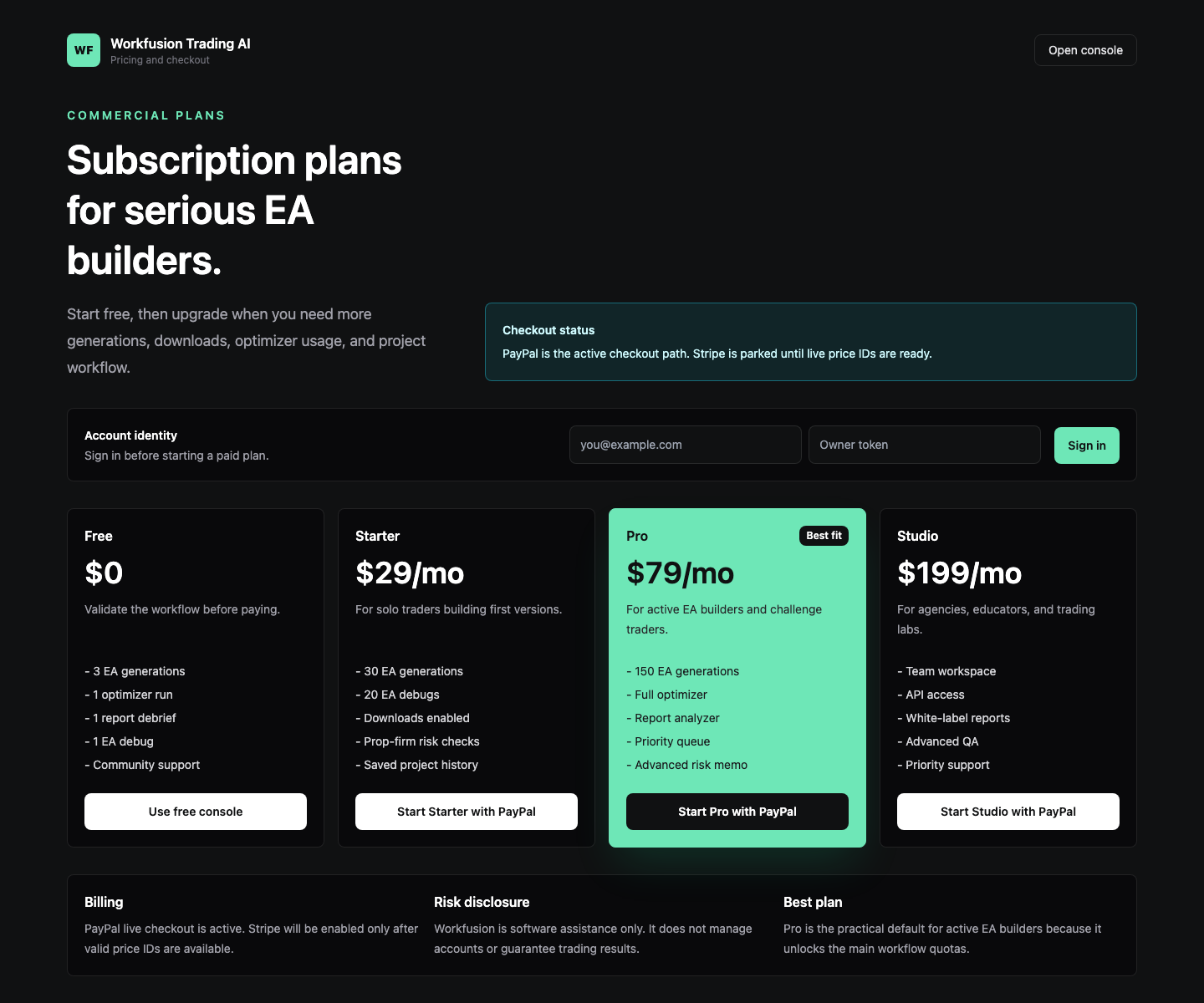
These captures show the operational surface: console, pricing, and brand assets built around reviewable EA workflow.
Proof asset 1
Operations console
Prompt, market, platform, prop preset, account state, checks, and downloadable MQL output in one view.
Proof asset 2
Iteration-based pricing
Freemium entry, safe PayPal path, and paid capacity for builders who need more loops.
Proof asset 3
Risk-aware brand system
Brand preview and share asset positioned as software tooling, not a signal or trading service.