No-code start
The category lets traders start from forms, templates, or plain-language strategy prompts.
Workfusion starts from the actual blocker: EA brief, MetaEditor error, prop-risk state, or report review.

Workfusionapp
MT4/MT5 EA operations desk
Generate MQL drafts, repair compiler blockers, run readiness checks, govern prop-style risk, and export the work for manual MetaEditor and Strategy Tester review.
Pricing comes after the first useful output: draft, compiler fix, risk check, or export workflow.
Pick the blocker you have today. No email required. Start with the one users bring most often: CTrade setup.
The first path preloads a real `trade` undeclared error, then keeps the EA draft, fix notes, and tutorial links together before any opt-in or paid plan.
Generate, debug, or govern first. Upgrade only when quota, downloads, or deeper review becomes the blocker.
Optional CTrade blocker pass
If this is your exact MT5 issue, opt in and send the first error, include section, CTrade declaration, and failing trade call.
Join only with explicit opt-in. No scraped list, no purchased database.
Free first output
Run the desk before paying.
Upgrade trigger
Pay when quota, downloads, or review depth becomes the bottleneck.
Risk posture
No signals, no broker access, no profit promises.
EA operations desk
A builder can move from blocker to artifact before upgrading.
01. Brief
freeStrategy + risk contract
02. Draft
generated.mq4 / .mq5 source
03. Repair
debuggedCompiler fix notes
04. Gate
checkedReadiness state
Market-grade workflow
Builders already expect AI drafting, no-code entry, browser-based iteration, exports, and test loops. Workfusionapp owns the missing layer: a safer desk for the artifact trail around every EA decision.
No-code start
The category lets traders start from forms, templates, or plain-language strategy prompts.
Workfusion starts from the actual blocker: EA brief, MetaEditor error, prop-risk state, or report review.
Fast artifact
Strong builders show a tangible output before the paywall: source, backtest, visual logic, or saved project.
The first useful output is reviewable MQL, fix notes, readiness evidence, or a governance PDF path.
Iteration engine
Users expect generation, testing, revisions, and export to live in the same workflow.
The desk keeps generate, repair, compile-check, govern, export, support, and quota status in one operating loop.
Trust boundary
Backtest-heavy tools can drift into performance theater if the interface hides validation limits.
Every screen keeps the boundary visible: software tooling only, no broker access, no signals, no profit promise.
Free useful output first
Start with the blocker slowing your EA build and move directly to an output you can inspect.
CTrade compiler error
Start with the most repeated support blocker: missing Trade.mqh include, missing CTrade object, or a trade.Buy/trade.Sell call out of scope.
Output: CTrade wiring notes plus a corrected reviewable draft path.
EA draft
Start from market, timeframe, entry, exit, and risk rules instead of a disconnected snippet.
Output: Inspectable MT4/MT5 source with explicit risk inputs.
Risk check
Check target remaining, drawdown buffer, daily loss, trading days, exposure, and report evidence.
Output: Readiness status and next manual validation step.
Generate
Turn a strategy brief into inspectable MQL with explicit risk inputs.
Repair
Paste MetaEditor errors and keep the first compiler blocker tied to a fixed draft.
Verify
Run static compile-readiness and backtest-readiness checks before manual testing.
Govern
Review drawdown, target distance, exposure, and report evidence without broker access.
Compiler trust loop
Compiler quality is the current trust gate. Workfusionapp makes the first error, expected fix, and compile evidence visible before the user upgrades.
Before
MetaEditor stops on the first structural issue, so random edits usually create more noise.
undeclared identifier 'trade'
wrong parameters count
#include <Trade/Trade.mqh> missing or CTrade trade not declared
After
Workfusionapp keeps the fix explicit: include the trade library, declare the trade object, and preserve risk checks.
#include <Trade/Trade.mqh>
CTrade trade;
if(!trade.Buy(lots,_Symbol)) Print(trade.ResultRetcode());
Gate
The output is not marketed as deployment-ready. It must pass static checks and, when available, MetaEditor worker compilation.
static_precheck -> remote MetaEditor worker -> .ex5 artifact when compiler passes
Conversion rule
After a useful output, the next CTA is a manual trial/demo review. That creates a measurable CRM trial request instead of another generic lead.
Conversion workflow
Workfusionapp is built around the jobs MT4/MT5 builders actually repeat: generation, debugging, compiler checks, payout governance, and project packaging.
Market, platform, risk cap, entry style, exit rules, and downloadable MQL.
Compiler/runtime blockers stay attached to the full EA context.
Payout distance, drawdown buffer, exposure, and report evidence stay visible.
Workfusion Govern
Keep the universal layer: target remaining, daily loss, total drawdown, minimum trading days, open exposure, payout readiness, warnings, and a PDF report. No broker credentials. No trading execution.
attack
Target is close and buffers are usable. Only clean, rule-respecting opportunities deserve risk.
defend
The account is alive but the buffer is not comfortable. Preserve drawdown before chasing target.
stop
A firm or internal safety boundary is breached or too close. Stop new risk and review.
review
No automatic action. Check target, rules, evidence lineage, and open exposure first.
Sample payout desk
Target left
77
Daily buffer
82
DD buffer
88
Review mode. Target is $2,350.00 away with usable total drawdown buffer.
Run the sample check to classify whether this account should attack, defend, stop, or stay in review.
Run a sample governance check or export the PDF report.
Operator console
Every action produces a visible state: running, success, error, or a downloadable artifact.
Strategy brief
Prompt and prop settings
Live result desk
Code, scores, fixes, and checks
Risk
87
Compliance
91
Readiness
88
Real MQ5 problem tests
Load a common EA developer issue, then run Fix code to see the diagnosis and tutorial link.
Fix code creates a corrected EA draft and shows the replacement below.
Compile check checks the current EA draft below. Without a MetaEditor worker, it is an honest static pre-check, not a real .ex5 build.
Backtest estimate estimates readiness from the current EA draft, or parses a pasted Strategy Tester report when supplied. It is diagnostic evidence, not a profit guarantee.
Output
No run yet. Generate an EA first, or paste code in the debug box and run Compile check.
Current EA draft
Manual debug input
#property strict
void OnTick(){
  if(PositionsTotal()==0){
    trade.Buy(0.10,_Symbol);
  }
}Proof loop
These captures show the operational surface: console, pricing, and brand assets built around reviewable EA workflow.

Prompt, market, platform, prop preset, account state, checks, and downloadable MQL output in one view.
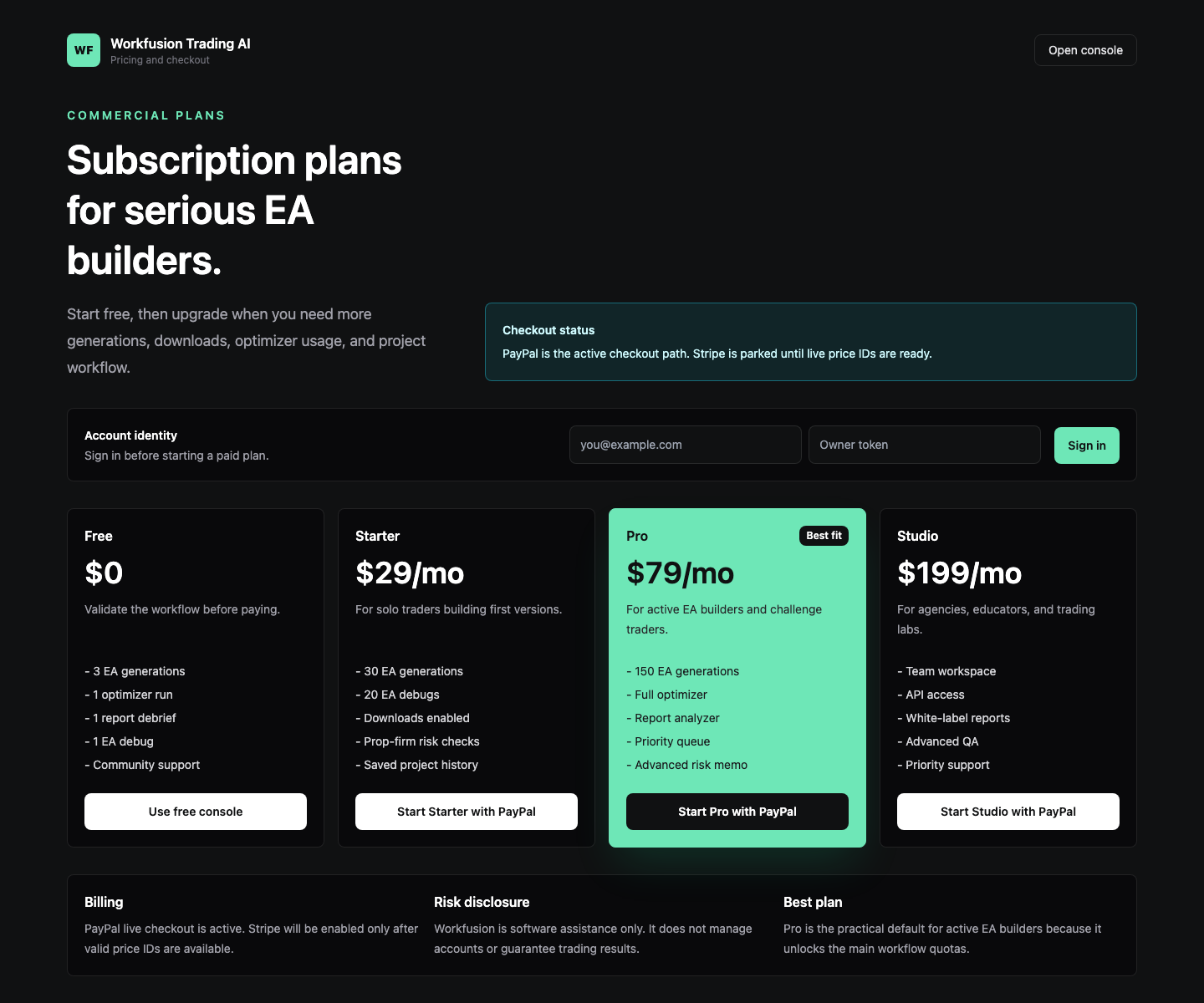
Freemium entry, safe PayPal path, and paid capacity for builders who need more loops.

Brand preview and share asset positioned as software tooling, not a signal or trading service.
Pricing
Free first
Generate or debug before paying.
Pro default
Best balance of generations, debugs, optimizer, and reports.
Clear risk line
Software assistance only. No trading result guarantee.
Free
$0
Validate the workflow.
Starter
$29/mo
For solo traders building first prototypes.
Pro
Best fit$79/mo
Best fit for active EA builders.
Studio
$199/mo
For trading labs and agencies.
EA builder resources
Build Notes
Public Workfusionapp notes on EA debugging patterns, compiler issues, and product workflow improvements.
Open page
EA Builder Resource Hub
Practical guides for compiler fixes, EA generation, debugging, prop risk, and code review.
Open page
MQL5 Compiler Fixer
Fix MetaEditor errors and produce a complete corrected EA draft.
Open page
MQL5 Undeclared Identifier Fixer
Fix missing variables, inputs, helpers, enums, includes, and compiler cascades.
Open page
MQL5 CTrade Fixer
Fix Trade.mqh, CTrade object scope, trade.Buy/trade.Sell, and retcode logging blockers.
Open page
MQL5 CopyBuffer Fixer
Fix indicator handles, copied counts, array indexes, and MQL5 signal-read blockers.
Open page
MQL5 Array Out of Range Fixer
Guard CopyBuffer counts, ArraySize, bar shifts, and unsafe indicator-buffer reads.
Open page
MQL5 History Deal Functions Fixer
Fix HistorySelect, HistoryDealGetTicket, deal properties, magic filters, and closed-PnL reports.
Open page
MQL4 OrderSend Error 130 Fixer
Fix invalid stops, stop levels, Digits, Point, NormalizeDouble, and wrong-side SL/TP.
Open page
EA Opens Too Many Trades Debugger
Find duplicate entries, persistent signals, missing cooldown, max-trade gaps, and magic-number count issues.
Open page
MT5 EA No Trades Debugger
Find why a compile-clean MT5 EA opens zero trades in Strategy Tester or demo.
Open page
MT5 Invalid Stops Fixer
Fix rejected SL/TP, stop-level, freeze-level, spread, and retcode 10016 blockers.
Open page
MT5 Invalid Volume Fixer
Fix rejected lots, min/max volume, lot-step mismatch, margin, and retcode 10014 blockers.
Open page
MT5 Unsupported Filling Mode Fixer
Fix invalid fill, symbol filling policy, and retcode 10030 execution blockers.
Open page
MT5 EA Generator
Turn strategy ideas into structured MQL5 Expert Advisor drafts.
Open page
MT4 EA Debugger
Review and clean MQL4 EA code before manual compile testing.
Open page
Daily Drawdown Guard for EA
Add max daily loss lockout, broker-day baseline, safety buffer, and auditable risk-state logs.
Open page
Spread Filter for Prop Firm EA
Measure broker spread, set session-aware caps, log blocked entries, and preserve trade-count evidence.
Open page
Prop Firm EA Risk Checker
Check sizing, drawdown, spread, and funding-readiness controls.
Open page
Prop Firm Payout Tracker
Track target remaining, drawdown buffer, trading days, exposure, and payout readiness.
Open page
MQL5 Code Review
Review lifecycle, trade calls, risk gates, and readiness before backtesting.
Open page
Support desk
Support messages are summarized and classified with OpenAI, then stored for the owner to review and improve the product.
Send a support message
Compiler errors, payment problems, broken output, missing features, or UX feedback.
Exact issue
One blocker, error, or broken output.
Page or workflow
Console, pricing, support, resources, or export.
Expected result
What should have happened.
Actual result
What happened instead.
The owner review decides whether the pattern becomes a product fix, FAQ, or resource update. Do not paste broker passwords, payment identifiers, or private account screenshots.
Send bugs, compiler errors, billing issues, or product feedback.
EA builder updates
Build the first audience with opt-in emails from MT4/MT5 builders. Do not import scraped or purchased lists.
Join only with explicit opt-in. No scraped list, no purchased database.